

2016年12月,google再次更新了android的版本,发布了android7.1的正式版,a7.0给我们带来了分屏等功能,那么7.1又给我们带来了哪些功能呢
app shortcuts 应用的快捷操作,类似于iOS的 3D Touch,android通过长按桌面快捷方式弹出一些快捷操作,是不是感觉很高大上呢?但是这种操作需要7.1与手机桌面的支持。
可惜的是国内各大rom还没有适配android7.1,大多数还是基于6.0的版本,更有5.0、4.4这个被放弃适配的手机,miui一直被嘲笑万年4.4,flyme 千年5.0等等。
不过目前有小米、联想、华为等厂商给部分手机升级了内核,适配了android7.0,不过都是新款旗舰,老旗舰真是彻底放弃了呢
笔者虽说不是手机Geek,手上zuk z2升级了7.0,nexus5通过论坛升级到CM14.1 android 7.1.1的版本,都无法进行shortcuts的操作😂,于是笔者下载了一款体验桌面Nova Launcher
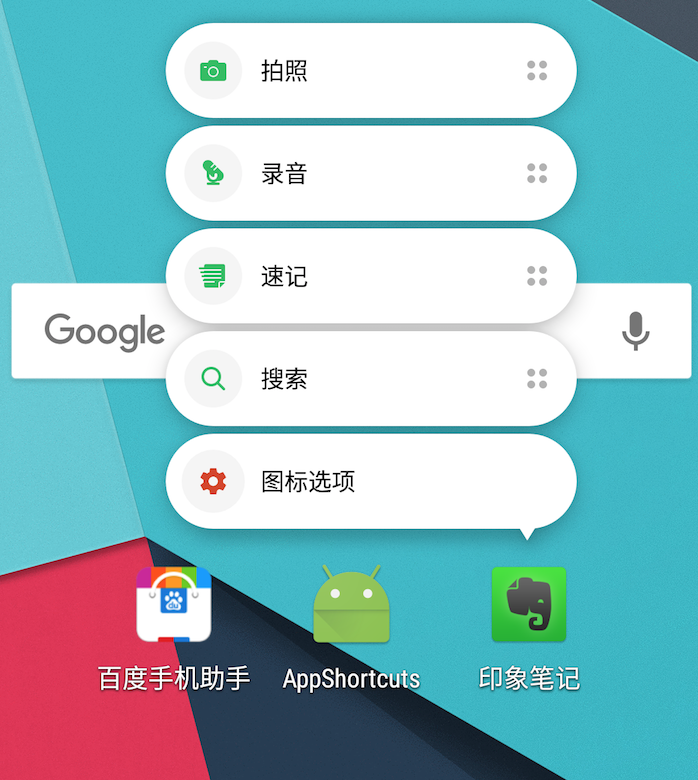
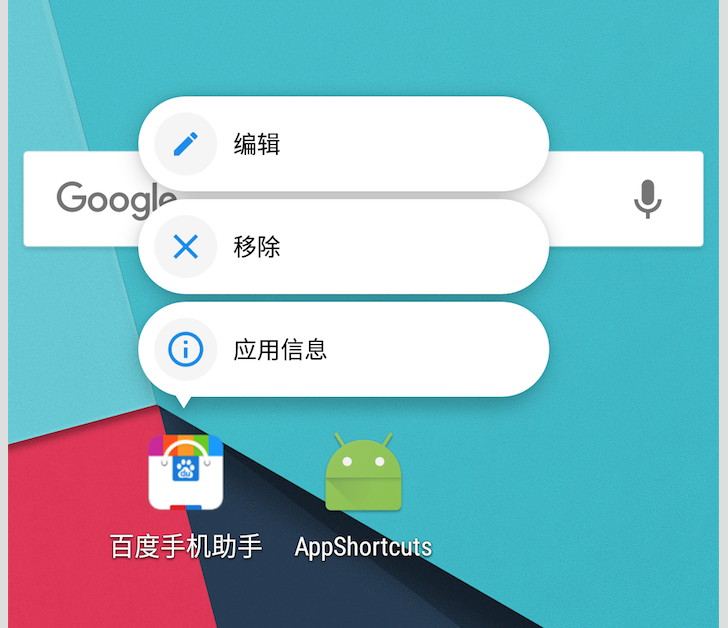
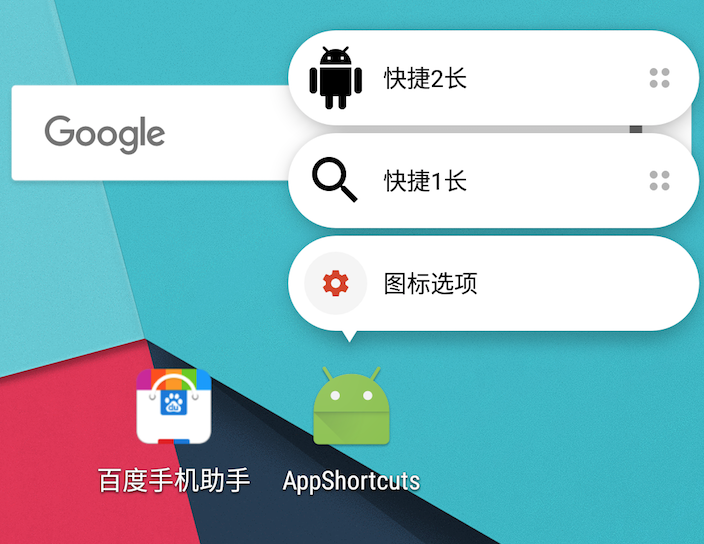
可以发现百度并没有适配7.1😂(Nova Launcher会默认显示4个操作,编辑、移除、应用信息、卸载),到时印象笔记给了4个shortcuts(最后为Nova Launcher默认显示),后面一个为我们的Demo。
那么如何适配shortcuts呢
App Shortcut可以分为两种不同的类型: Static Shortcuts(静态快捷方式) 和 Dynamic Shortcuts(动态快捷方式)。
Static Shortcuts
在打包到apk的资源文件中定义,所以,直到下一次更新版本时才能改变静态快捷方式的详细说明。
创建Static Shortcuts分为以下几步
- 在manifest配置文件中找到android.intent.category.LAUNCHER 的Activity
添加
标签,引用shortcuts资源文件 12345678910<activity android:name=".MainActivity"><intent-filter><action android:name="android.intent.action.MAIN" /><category android:name="android.intent.category.LAUNCHER" /></intent-filter><meta-dataandroid:name="android.app.shortcuts"android:resource="@xml/shortcuts" /></activity>res创建资源文件
res/xml/shortcuts.xml12345678910111213141516171819202122232425262728293031<?xml version="1.0" encoding="utf-8"?><shortcuts xmlns:android="http://schemas.android.com/apk/res/android"><shortcutandroid:enabled="true"android:icon="@drawable/ic_search_black_24dp"android:shortcutDisabledMessage="@string/static_shortcut_disabled_message"android:shortcutId="static"android:shortcutLongLabel="@string/static_shortcut_long_label_1"android:shortcutShortLabel="@string/static_shortcut_short_label_1"><intentandroid:action="android.intent.action.VIEW"android:targetClass="com.jsqix.dongqing.appshortcuts.StaticShortcutActivity"android:targetPackage="com.jsqix.dongqing.appshortcuts" /></shortcut><shortcutandroid:enabled="true"android:icon="@drawable/ic_android_black_24dp"android:shortcutDisabledMessage="@string/static_shortcut_disabled_message"android:shortcutId="static_2"android:shortcutLongLabel="@string/static_shortcut_long_label_2"android:shortcutShortLabel="@string/static_shortcut_short_label_2"><intentandroid:action="android.intent.action.MAIN"android:targetClass="com.jsqix.dongqing.appshortcuts.MainActivity"android:targetPackage="com.jsqix.dongqing.appshortcuts" /><intentandroid:action="android.intent.action.VIEW"android:targetClass="com.jsqix.dongqing.appshortcuts.StaticShortcutActivity"android:targetPackage="com.jsqix.dongqing.appshortcuts" /></shortcut></shortcuts>
shortcut下标签的含义:
- enabled
shortcut是否可用 - icon
显示在左边的图标,可用使用Vector drawable - shortcutDisabledMessage
shortcut不可用时,仍然出现在快捷中,但显示为灰色,点击时弹出此内容的toast - shortcutLongLabel
启动器有足够多的空间时,会显示这个标签所定义的内容 - shortcutShortLabel
shortcut的简要说明,是必需字段。当shortcut被添加到桌面上时,显示的也是这个字段 - intent
shortcut关联的一个或者多个intent,当用户点击shortcut时被打开 - shortcutId
shortcut的唯一标示id,若存在具有相同shortcutId的shortcut,则只显示一个
这样静态shortcuts就定义成功了,运行起来就会出现上面图片中的效果,其中点击搜索的shortcut,进入StaticShortcutActivity,返回时回到桌面,点击android的shortcut,进入StaticShortcutActivity,返回时回到MainActivity
Dynamic Shortcuts
通过ShortcutManager API在运行时发布,在运行时,应用可以发布,升级和移除快捷方式。
- 发布
使用setDynamicShortcuts()重新定义整个动态快捷方式列表,或者是使用addDynamicShortcuts()向已存在的动态快捷方式列表中添加快捷方式。 - 更新
使用updateShortcuts()方法。 - 移除
使用removeDynamicShortcuts()方法移除特定动态快捷方式或者使用removeAllDynamicShortcuts()移除所有动态快捷方式。
下面我们使用api实现静态shortcuts的两个情况
在MainActivity中创建动态shortcuts12345678910111213141516171819202122232425protected void onCreate(Bundle savedInstanceState) {...createShortcuts();}(25)private void createShortcuts() {ShortcutManager shortcutManager = getSystemService(ShortcutManager.class);ShortcutInfo shortcutInfo = new ShortcutInfo.Builder(this, "dynamic").setShortLabel("拍照").setLongLabel("拍照").setIcon(Icon.createWithResource(this, R.drawable.ic_camera_alt_black_24dp))//.setIntent(new Intent(Intent.ACTION_VIEW, Uri.EMPTY,this,DynamicShortcutActivity.class)).setIntents(// this dynamic shortcut set up a back stack using Intents, when pressing back, will go to MainActivity// the last Intent is what the shortcut really openednew Intent[]{new Intent(Intent.ACTION_MAIN, Uri.EMPTY, this, MainActivity.class).setFlags(Intent. FLAG_ACTIVITY_CLEAR_TASK),new Intent(DynamicShortcutActivity.ACTION_OPEN_DYNAMIC)// intent's action must be set}).build();shortcutManager.setDynamicShortcuts(Collections.singletonList(shortcutInfo));}
创建空的DynamicShortcutActivity,在manifest清单中
通过setIntent实现打开shortcuts返回桌面,通过setIntents实现打开shortcuts返回到我们指定的MainActivity
注意Shortcuts有个数限制,因此采用动态创建时需要判断最大的限制getMaxShortcutCountPerActivity否则会抛异常
其他
- 当static shortcut 和 dynamic shortcut一起展示时,我们如何决定其显示的顺序呢?
在 ShortcutInfo.Builder 中有一个专门的方法 setRank(int) ,通过设置不同的等级,我们就可以控制动态快捷方式的出现顺序,等级越高,出现在快捷方式列表中的位置就越高。 - 我们还可以设置动态快捷方式的shortLabel的字体颜色12345678ForegroundColorSpan colorSpan = new ForegroundColorSpan(getResources().getColor(android.R.color.holo_red_dark, getTheme()));String label = "拍照";SpannableStringBuilder colouredLabel = new SpannableStringBuilder(label);colouredLabel.setSpan(colorSpan, 0, label.length(), Spanned.SPAN_INCLUSIVE_INCLUSIVE);ShortcutInfo shortcutInfo = new ShortcutInfo.Builder(this, "dynamic").setShortLabel(colouredLabel).setRank(1).build();
原则
- 为了保持我们的应用和系统应用的快捷方式在视觉上一致性,应该遵守App Shortcuts Design Guidelines
- 尽管现在的API支持静态和动态总共5个快捷方式,但是为了提高shortcut的视觉效果,建议只添加4个不同的快捷方式
- 如果可能的话,应该将「short description」的文字长度控制在10个字母以内,将「long discription」的长度限制在25个字母以内
- 在备份和恢复时,动态shortcuts不应该被保存。
最后
以上就是android7.1给我们带来的app shortcuts功能,实现起来也不是非常的难,给人一种高大上的3D Touch效果,还是值得肯定的。就是国内厂家不知何时适配,说不定不用更新内核就添加上该功能呢(flyme5在5.0上实现分屏的功能😌)。